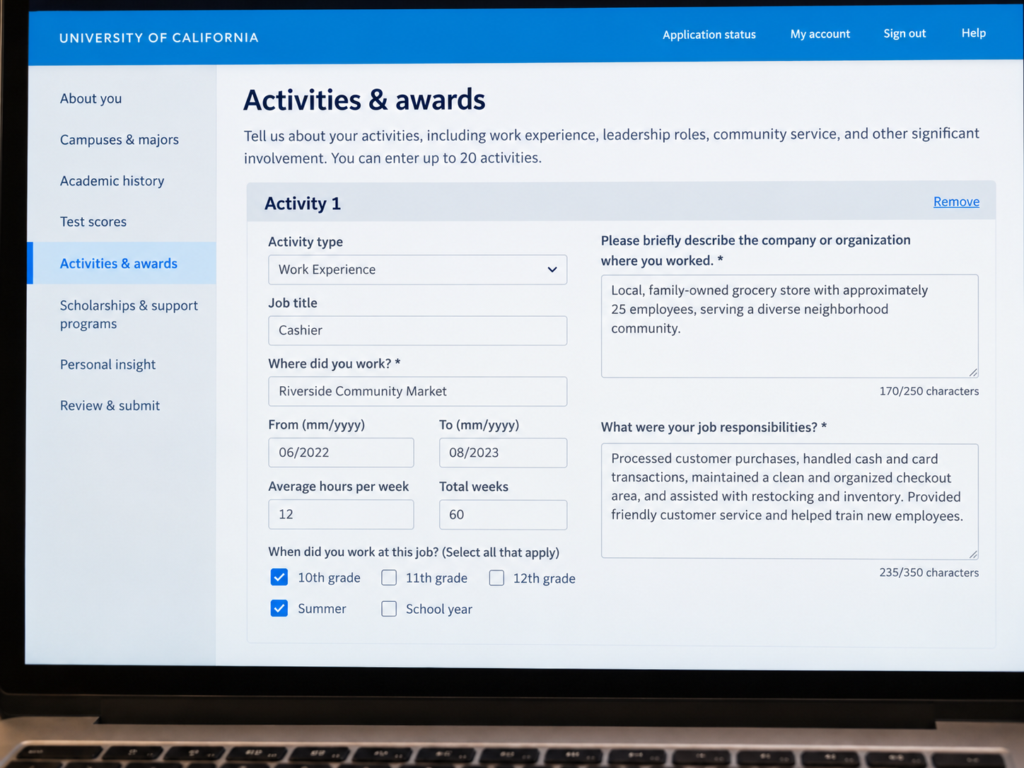
The UC Application is not the Common App. Students who’ve already filled out their Common App sometimes sit down to work on their UC Application expecting the same experience. The two forms look different, work differently, and reward slightly different approaches.
This guide covers the UC Application activities section completely: how many slots you get, how the categories work, what to write in each field, and the one rule that trips up more students than any other.
The Big Picture: Up to 20 Activities
The UC Application gives you up to 20 activity slots, organized into six categories:
Educational Preparation Programs
Extracurricular Activities
Volunteer and Community Service
Work Experience
Awards and Honors
Other Coursework
This is roughly twice the capacity of the Common App. That doesn’t mean you need to fill all 20 — quality still beats quantity — but it does mean the UC Application has room for a fuller picture of your life than the Common App can hold.
The six categories aren’t equal in how many entries you can make. Most students will have entries in three or four categories, with Extracurricular Activities and Work Experience seeing the most use.
Before You Start: Plan Your Order
The UC Application doesn’t have a drag-and-drop option. Once you’ve entered an activity, the only way to change its position is to delete it and re-enter it — and with up to 20 entries, that’s not something anyone wants to deal with after the fact.
The practical move is to plan your order before you open the form. Your College Torch Activities List Template lets you organize and reorder freely; once the order is settled, you enter everything into the application once, in the right sequence. Your strongest, most significant entry in each category should be the first one you type.
The Description Field and Position Field
The UC Application gives you 350 characters per description — more than twice the Common App’s 150. Use that room to add specifics, not adjectives. Start with a verb (implied “I”), include numbers wherever you have them, and cut anything that could describe any student in any version of the same role.
The UC Application also uses a convention of beginning your description by restating your position with a colon: “Section Leader: led weekly sectionals for 14 woodwind players…” This ensures your role is visible even when the position field doesn’t display prominently alongside the description text.
The Three Categories With Extra Boxes
Three of the six categories ask for more than just a description:
Volunteer and Community Service adds the question: “What did you gain from this experience?” You get 250 characters, and unlike the description field, this one expects full sentences and reflection. The question is asking what the experience meant to you, not what you did. Keep it genuine and specific — not “I learned leadership and teamwork” (which tells a reader nothing) but what you actually came away with.
Work Experience gives you additional fields to specify which grade levels you worked and to describe your responsibilities in more detail. If you worked across multiple years, you can note that progression here. If you held the same job from sophomore year through senior year, say so. That continuity is worth showing.
Awards and Honors asks context questions for each award: who granted it, how many students were eligible, when you received it. This context is essential because an award’s significance is invisible without it. “First place, State Science Olympiad” reads differently than “Participant, Classroom Science Fair” — but without context, both just say you won something. Fill in the eligibility and scope information honestly.
Don’t skip these extra boxes. They’re there because the UC System decided they needed more information about these specific types of contributions. A blank box looks like you didn’t finish the application.
Category by Category
Educational Preparation Programs This is specifically for programs designed to support college access: AVID, MESA, Upward Bound, GEAR UP, Puente, EOP, and similar structured programs. If you participated in any of these, they belong here, not in Extracurricular Activities. Students who’ve been through these programs sometimes don’t realize they qualify as a separate category worth highlighting.
Extracurricular Activities Clubs, teams, arts ensembles, student government, journalism, theater, community organizations, religious youth groups — anything you did outside of class that doesn’t fit more cleanly in another category. This is the largest and most flexible bucket.
Volunteer and Community Service Unpaid service work: food banks, tutoring programs, neighborhood cleanup, hospital volunteering, community organizing. Anything you did for free and for others. Includes informal service that wasn’t organized through a school club.
Work Experience Paid work of any kind: jobs, regular gigs (babysitting, lawn care, dog walking with repeat clients), family business work. Include the hours and the years. Underreporting here is one of the most common mistakes I see.
Awards and Honors Academic awards, competition placements, scholarships, recognitions. Don’t only list the name — fill in the context fields so a reader understands what the award means. A regional poetry award given to three students in California is more significant than a school-wide certificate, but only if the reader knows that.
Other Coursework Classes taken outside your regular school transcript: community college courses, online coursework, language programs, conservatory training, summer academic programs. If you pursued coursework that didn’t show up in your school’s gradebook, this is where it lives.
What to Do With More Than 20 Activities
Most students won’t hit 20 entries. But if you have genuinely more significant activities than the form can hold, the UC Application includes an Additional Comments field (approximately 550 characters) near the end of the application.
Use this field sparingly. It’s not a second activities section, and loading it with activity entries looks like you couldn’t make decisions. But if there’s something genuinely significant that has no home in the six categories — a major project, an unusual circumstance that shaped your high school years, context a reader needs to understand your application fully — this is where it goes.
The UC Application vs. the Common App
If you’re filling out both applications, your descriptions don’t have to be identical, and they probably shouldn’t be. The UC App gives you 350 characters; use them. The Common App gives you 150; cut hard.
The order can also differ. You might lead with different activities depending on which campus’s priorities you’re optimizing for, or simply because the two forms organize things differently. Treat each application as its own document rather than a copy of the other.
Ready to Fill It Out
The UC Application activities section rewards the same thing the Common App does: specific, honest descriptions of what you actually did, entered by the students who took the time to think carefully about how to represent themselves.
The form is more complex. The character limits are more generous. Plan your order before you start entering, know which categories ask for extra context, and you’ll be ahead of most applicants.
If you want to work through the full process for both applications, the Dazzling Activities course covers every field and every decision, with examples for both platforms.